PlayingCard Component
Welcome to the documentation for PlayingCard, a fully interactive React component that displays realistic, animated playing cards with seamless flip transitions. Quickly build card UIs or prototype games and experiences-plus, explore the advanced PlayingCardWithToggle example for rapid prototyping.
At a Glance
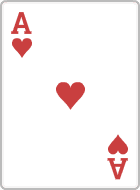
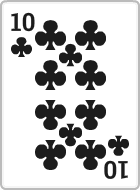
The PlayingCard component renders a crisp, visually rich playing card. It animates between card faces with a 3D flip effect whenever the displayed suite or rank changes. To show the back of the card, just provide null for both props.
Installation
Only clsx and motion are needed. If you don’t have them, install with your preferred package manager:
npm install clsx motion
Don’t forget the card images!
Download cards.zip
If it doesn’t start, right-click and "Save link as...".
Place the images in /public/cards/. Naming convention:
/cards/card<Suite><Rank>.png(e.g./cards/cardHeartsA.png)/cards/cardBack_blue4.png(for the card back)
Component Source
PlayingCard
'use client'
import { useEffect, useState } from 'react'
import { motion } from 'motion/react'
import clsx from 'clsx'
import Image from 'next/image'

export type Suite = 'Spades' | 'Hearts' | 'Diamonds' | 'Clubs'
export type Rank = '2' | '3' | '4' | '5' | '6' | '7' | '8' | '9' | '10' | 'J' | 'Q' | 'K' | 'A'

export interface PlayingCardProps {
    suite: Suite | null
    rank: Rank | null
    className?: string
}

const PlayingCard = ({ suite, rank, className }: PlayingCardProps) => {
    const [isFlipped, setIsFlipped] = useState(false)
    const [currentSuite, setCurrentSuite] = useState(suite)
    const [currentRank, setCurrentRank] = useState(rank)

    useEffect(() => {
        if (suite === currentSuite && rank === currentRank) return

        setIsFlipped(true)
        const timer = setTimeout(() => {
            setCurrentSuite(suite)
            setCurrentRank(rank)
            setIsFlipped(false)
        }, 200)

        return () => clearTimeout(timer)
    }, [suite, rank, currentSuite, currentRank])

    const cardImageSrc =
        currentSuite && currentRank
            ? `/cards/card${currentSuite}${currentRank}.png`
            : '/cards/cardBack_blue4.png'
    const cardAlt =
        currentSuite && currentRank
            ? `${currentRank} of ${currentSuite}`
            : 'Card back'

    return (
        <div className={clsx('w-[100px] h-[140px] select-none', className)}>
            <motion.div
                className="w-full h-full relative"
                initial={false}
                animate={{
                    rotateY: isFlipped ? 90 : 0,
                    scale: isFlipped ? 1.05 : 1,
                    boxShadow: isFlipped
                        ? '0px 10px 25px rgba(0, 0, 0, 0.2)'
                        : '0px 5px 15px rgba(0, 0, 0, 0.1)',
                }}
                transition={{ type: 'spring', stiffness: 350, damping: 22, duration: 0.2 }}
                whileHover={{
                    y: -5,
                    boxShadow: '0px 15px 30px rgba(0, 0, 0, 0.3)',
                    transition: { duration: 0.2 },
                }}
                style={{
                    perspective: 600,
                    willChange: 'transform',
                }}
                aria-label={cardAlt}
            >
                <motion.div>
                    <Image
                        src={cardImageSrc}
                        alt={cardAlt}
                        draggable={false}
                        className="w-full h-full object-cover select-none pointer-events-none"
                        loading="eager"
                        decoding="async"
                        width={100}
                        height={140}
                    />
                </motion.div>
            </motion.div>
        </div>
    )
}

export default PlayingCard
Usage
To use, just import and render:
import PlayingCard from '@/components/Examples/PlayingCard'

<PlayingCard rank="K" suite="Diamonds" />
<PlayingCard rank={null} suite={null} /> {/* Renders card back */}
Props
| Name | Type | Default | Description |
|---|---|---|---|
| suite | 'Spades' | 'Hearts' | 'Diamonds' | 'Clubs' | null | - | Which suite to display. Use null for card back |
| rank | '2'–'10', 'J', 'Q', 'K', 'A' | null | - | The rank value. Use null with suite for back of card |
| className | string | - | Additional CSS classes for custom styling of the outer wrapper |
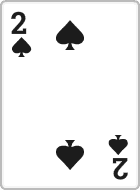
Live Example
Assets
- Place card images in
/public/cards/card<Suite><Rank>.png(e.g./cards/cardHeartsA.png) - Card back image:
/public/cards/cardBack_blue4.png - Feel free to use your own styles or image set if preferred!
Accessibility
- The underlying image has an informative
aria-labelfor screen readers - No text is leaked when showing the card back
- Non-interactive by default-add your own controls or event logic as needed
- Wrap in button or add keyboard logic for full accessibility, if desired
What's next?
- 3D Button Component - Interactive button with sound effects
- Wheel Component - Interactive spinning wheel
- useQueryParamsState Hook - Manage URL query parameters